

Insights That Drive Results: Shane Worley The Marketing 1 Blog
Welcome to the official blog of Shane Worley the Marketing 1 LLC—your go-to source for real, practical, and proven strategies in SEO, Google Ads, and social media marketing. Whether you're a small business owner aiming to boost visibility or a service-based company looking to convert more leads, our blog is packed with up-to-date tips, how-to guides, and expert insights. We don’t just talk trends—we share what actually works. Dive in, explore freely (no subscriptions here), and take your marketing efforts to the next level.

What Is Crawl Budget and Does It Matter for SEO?
What Is Crawl Budget and Does It Matter for Your Business Website?
Search engines don't magically know everything published on your website. Before a page can potentially appear in search results, search engines need to discover it, crawl it, process the information, and determine whether it should be indexed.
That crawling process requires resources.
This is where the term crawl budget enters the SEO conversation.
Crawl budget is frequently discussed as though every small business should be obsessively monitoring how many pages Google crawls each day. For most small websites, that isn't necessary. However, understanding how search engines crawl your website can reveal technical problems that affect page discovery, indexing, and overall SEO performance.
For businesses investing in search engine optimization, the real objective isn't maximizing crawler activity. It's making sure search engines can efficiently find the pages that actually matter.
What Is Crawl Budget?
Crawl budget generally refers to the amount of crawling a search engine is willing and able to perform on a website within a given period.
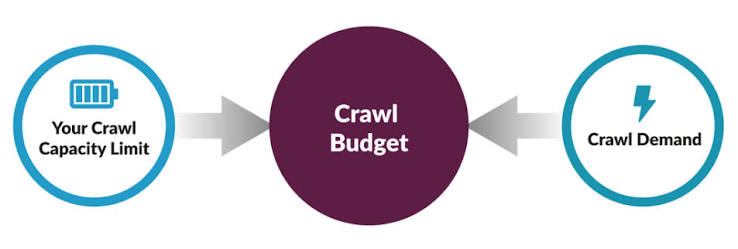
Google describes crawl budget primarily through two concepts: crawl capacity limit and crawl demand.
Crawl capacity relates to how much crawling a website's server can handle without creating problems.
Crawl demand relates to how much Google wants to crawl particular URLs based on factors such as popularity, freshness, and other considerations.
Put those concepts together and you have a practical question:
How much time and attention will Googlebot spend crawling your website?
Does Crawl Budget Matter for Small Business Websites?
Usually, it isn't something small businesses need to worry about every morning over coffee.
A local contractor with 40 well-organized webpages probably doesn't have the same crawl-management concerns as an ecommerce company containing hundreds of thousands of product URLs.
Google itself indicates that crawl budget management is primarily important for very large or rapidly changing websites.
Still, smaller websites can experience crawling and indexing problems caused by poor technical configuration.
Those problems deserve attention even if "crawl budget" isn't technically the primary issue.
Search Engines Need Clear Paths to Your Pages
Imagine entering a building where every hallway leads to another hallway, doors repeatedly send you back where you started, and half the rooms contain identical information.
Finding the important rooms would take longer than necessary.
Websites can create similar problems.
Search engines may encounter:
Duplicate URLs
Redirect chains
Broken links
Parameter-generated pages
Thin content
Orphan pages
Incorrect canonical tags
Poor navigation
A clean website structure reduces unnecessary confusion.
Duplicate URLs Can Waste Crawling Resources
One webpage can sometimes be accessible through several different URLs.
For example:
Those URLs may display identical content.
On larger websites, thousands of URL variations can be created through:
Filters
Sorting options
Tracking parameters
Session identifiers
Search functions
Search engines may spend time discovering these variations rather than focusing on valuable pages.
Proper canonicalization and URL management help reduce unnecessary duplication.
Broken Links Create Dead Ends
Internal links should guide visitors and crawlers toward useful content.
A broken internal link sends both into a dead end.
Occasional broken links happen naturally as websites evolve, but large numbers can indicate poor maintenance.
Common causes include:
Deleted pages
Changed URLs
Website redesigns
Outdated blog links
Removed services
Periodic technical audits can identify broken links and determine whether they should be updated, redirected, or removed.
Redirect Chains Make Crawling Less Efficient
Redirects are normal and often necessary.
Suppose:
Page A → Page B
That's straightforward.
Problems develop when years of website changes create something like:
Page A → Page B → Page C → Page D
Now crawlers and visitors are passing through multiple unnecessary steps before reaching the final destination.
Whenever possible, internal links should point directly to the current URL.
Cleaning old redirect chains can improve technical efficiency and user experience.
Your XML Sitemap Helps Identify Important URLs
An XML sitemap provides search engines with a list of URLs you consider important.
A clean sitemap should generally contain canonical, indexable pages such as:
Service pages
Location pages
Blog articles
Important resources
It shouldn't become a graveyard filled with:
Deleted pages
Redirects
Duplicate URLs
Test pages
Non-indexable content
Your sitemap should communicate:
These are the pages worth discovering.
Learn more about how technical SEO fits into your broader strategy through our SEO services.
Internal Linking Helps Crawlers Discover Content
A sitemap shouldn't be the only way search engines find your pages.
Internal links are essential.
Your homepage should connect to important services.
Service pages should connect to relevant supporting content.
Blog articles should link to other helpful articles and services.
For example, an article discussing Google Ads optimization could naturally link to your pay-per-click advertising services.
This creates a logical structure for both customers and search engines.
Watch Out for Orphan Pages
An orphan page has no meaningful internal links pointing to it.
The page may technically exist and even appear in your sitemap, but visitors can't naturally discover it while browsing your website.
That's usually a sign worth investigating.
Ask:
Is this page still valuable?
Should other content link to it?
Does it belong in navigation?
Is it outdated?
Should it be consolidated elsewhere?
Important pages shouldn't feel abandoned.
Page Speed Can Affect Crawling
Server performance can influence crawling behavior.
If a website responds slowly or frequently produces server errors, search engines may reduce crawling to avoid overwhelming the server.
This creates another connection between technical SEO and website performance.
Improving hosting, caching, image optimization, and website code can benefit customers while also creating a healthier environment for search crawlers.
Robots.txt Can Control Some Crawler Access
A robots.txt file provides instructions about areas crawlers may or may not access.
For large websites, this can help prevent unnecessary crawling of certain URL patterns.
However, robots.txt must be configured carefully.
Blocking important resources or entire sections accidentally can create serious discovery problems.
It's a powerful little file.
Treat it accordingly.
Thin Pages Can Create Website Bloat
Over time, websites can accumulate pages that serve little purpose.
Examples include:
Old promotional pages
Nearly empty category pages
Duplicate service pages
Automatically generated archives
Abandoned landing pages
More indexed pages don't automatically mean more SEO success.
Sometimes cleaning a website produces a stronger structure than continuing to add content indefinitely.
Every indexable page should ideally provide meaningful value.
Ecommerce Websites Need Greater Crawl Management
Crawl budget becomes more significant for ecommerce websites because filters and product combinations can generate enormous numbers of URLs.
A store might allow customers to filter products by:
Color
Size
Price
Brand
Rating
Availability
Different combinations can create thousands of URLs even though the store contains far fewer actual products.
Without thoughtful technical management, crawlers can become occupied exploring low-value combinations.
Large ecommerce SEO therefore requires careful attention to crawling, canonicalization, faceted navigation, and indexing.
Use Search Console to Understand Crawling
Google Search Console provides crawl statistics that can help website owners understand Googlebot activity.
Depending on the available data, you may review information related to:
Crawl requests
Response codes
File types
Googlebot types
Host status
These reports can help diagnose unusual crawling patterns or technical problems.
However, numbers need context.
Seeing crawler activity increase or decrease isn't automatically good or bad.
The underlying reason matters.
Don't Try to Force Google to Crawl Everything Constantly
Some businesses become obsessed with submitting every URL repeatedly or searching for tricks that make Google crawl pages faster.
That's usually unnecessary.
Focus on fundamentals:
Publish valuable content.
Maintain good internal linking.
Keep your sitemap accurate.
Fix technical errors.
Use canonical URLs properly.
Maintain reliable server performance.
Make your website worth crawling and easy to understand.
Crawl Efficiency Supports a Larger SEO Strategy
Crawl management isn't a standalone marketing strategy.
It works alongside:
Content quality
Search intent
Internal linking
Schema markup
Canonical tags
Page speed
Mobile usability
Backlinks
At Shane Worley, the Marketing 1, technical SEO is evaluated as part of the complete customer acquisition process.
Our digital marketing services combine organic search with social media marketing, paid advertising, website optimization, and content development.
Technical improvements matter because they help your valuable content get discovered.
Final Thoughts
For most small businesses, crawl budget isn't something that requires daily attention.
Crawl efficiency, however, absolutely deserves consideration.
A website filled with broken links, unnecessary redirects, duplicate URLs, orphan pages, and outdated content creates additional obstacles for search engines and customers.
Keep the structure clean.
Make important pages easy to discover.
Ensure your XML sitemap reflects the content you actually want indexed.
And remember: the goal isn't getting Google to crawl the largest possible number of URLs. It's helping search engines efficiently discover your best pages.
Explore additional SEO resources on the Shane Worley, the Marketing 1 blog, or contact us to discuss a technical SEO audit for your website.

Contact Us
Copyright 2023 Shane Worley The Marketing 1 LLC All Rights Reserved


Email: [email protected]
Mobile: (815 849-8327Address:
610 Meacham Rd #1190, Elk Grove Village, IL 60007