
Core Web Vitals Explained for Business Owners
Core Web Vitals Explained: What Business Owners Need to Know
Have you ever clicked a website from Google and waited while the page slowly appeared? Maybe you tried tapping a button that wouldn't respond immediately. Or perhaps you were reading something when the entire page suddenly shifted because an image loaded above the text.
Those experiences are frustrating, and they're exactly the types of problems Core Web Vitals are intended to measure.
Core Web Vitals are performance metrics Google uses to evaluate important aspects of a visitor's experience on a webpage. While they aren't the only consideration in search rankings, they provide business owners with useful information about how quickly and smoothly their websites work for real users.
For a small business, this matters beyond SEO. Every unnecessary delay creates another opportunity for a potential customer to leave.
What Are Core Web Vitals?
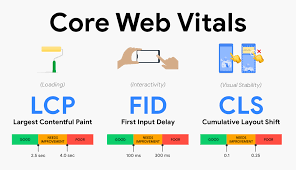
Core Web Vitals focus on three primary aspects of webpage performance: loading, responsiveness, and visual stability.
The current metrics are:
Largest Contentful Paint (LCP)
Interaction to Next Paint (INP)
Cumulative Layout Shift (CLS)
These names sound technical, but the concepts behind them are relatively simple.
Is the page loading quickly?
Does it respond promptly when someone interacts with it?
Does the layout remain stable while it loads?
If you've ever become irritated with a slow or jumpy website, you've already experienced why these measurements matter.
What Is Largest Contentful Paint?
Largest Contentful Paint measures how quickly the primary visible content loads.
This could be:
A large hero image
A prominent heading
A banner
A major block of text
Google considers an LCP of 2.5 seconds or less a good experience for most users.
Imagine someone searching for an emergency plumber from their phone. They click a result and stare at a blank screen while a massive homepage image loads.
They're unlikely to patiently admire the photography.
They may simply hit the back button and call someone else.
That's why improving LCP can have practical business value.
What Is Interaction to Next Paint?
Interaction to Next Paint measures responsiveness.
In simpler terms, it evaluates how quickly your webpage visually responds after someone interacts with it.
Interactions might include:
Clicking navigation
Opening a menu
Selecting an option
Tapping a button
Google identifies 200 milliseconds or less as a good INP result.
A visitor shouldn't click your "Request a Quote" button and wonder whether anything happened.
Fast interaction creates confidence. Delayed interaction creates frustration.
What Is Cumulative Layout Shift?
Cumulative Layout Shift measures visual stability.
You've probably encountered this problem before.
You're about to tap a button when an advertisement or image suddenly loads, pushing everything downward. You accidentally click something completely different.
Annoying, right?
That's layout shift.
Common causes include:
Images without specified dimensions
Advertisements loading dynamically
Fonts changing after loading
Embedded content
Third-party widgets
Google considers a CLS score of 0.1 or less a good user experience.
Keeping page elements stable makes websites easier and more pleasant to use.
Why Core Web Vitals Matter for SEO
Google wants search results to lead users to useful websites that provide positive experiences.
Core Web Vitals are part of Google's broader page experience considerations. However, business owners shouldn't assume that achieving perfect scores automatically guarantees first-page rankings.
It doesn't.
Google states that good Core Web Vitals alone don't guarantee top rankings because its search systems evaluate many different signals.
Content relevance, authority, links, search intent, local signals, and many other factors remain important.
Core Web Vitals should therefore be viewed as one component of a complete SEO strategy.
Website Performance Affects More Than Rankings
Here's where Core Web Vitals become especially important for business owners.
Your website exists to produce results.
Depending on your company, that may mean generating:
Phone calls
Appointment requests
Quote submissions
Online purchases
Store visits
A visitor who becomes frustrated with your website may never reach the conversion point.
You could have excellent SEO bringing people through the door while poor website performance quietly sends them right back out.
Traffic means little if visitors don't stay long enough to contact you.
Large Images Are Common Performance Problems
High-resolution photography looks great, but enormous image files can dramatically slow webpages.
This frequently happens when someone uploads an image directly from a professional camera or smartphone without optimizing it first.
Website images should be appropriately:
Sized
Compressed
Formatted
Loaded
Modern formats and compression techniques can significantly reduce file sizes without creating noticeable visual degradation.
Your website doesn't need a billboard-sized image file to display a picture that's only 600 pixels wide.
Third-Party Scripts Can Slow Websites Down
Modern websites frequently contain scripts from outside platforms.
Examples include:
Analytics tools
Advertising trackers
Chat widgets
Review systems
Scheduling applications
Social media embeds
These tools can provide real business value, but adding too many can affect performance.
Before installing another widget, ask whether it genuinely contributes to the customer experience or your marketing strategy.
Sometimes less really is more.
Mobile Performance Deserves Special Attention
Your website might feel lightning-fast on your office computer connected to high-speed internet.
That doesn't mean every customer receives the same experience.
Someone may visit your website using:
An older smartphone
Cellular data
A weaker connection
Limited processing power
Testing under realistic conditions provides a much better understanding of website performance.
This is especially important for local service businesses because customers frequently search from phones while they need immediate help.
How Do You Measure Core Web Vitals?
Several tools can help evaluate performance.
Google provides PageSpeed Insights, which reports performance information and Core Web Vitals data when available.
Google Search Console can also provide Core Web Vitals reporting across groups of website URLs.
These tools can identify issues, but automated scores shouldn't be viewed without context.
A professional review should determine which problems actually matter and which improvements should receive priority.
Don't Sacrifice Your Website for a Perfect Score
Performance matters, but chasing a perfect score can become counterproductive.
Your website still needs:
Helpful content
Professional imagery
Contact functionality
Conversion tracking
Useful interactive features
Removing every useful feature just to increase a performance score isn't necessarily good marketing.
The objective should be a fast, functional website that provides an excellent customer experience.
Core Web Vitals Should Be Part of Regular SEO Audits
Website performance changes over time.
New images get uploaded. Plugins are added. Tracking scripts change. Content grows.
That's why Core Web Vitals should be reviewed periodically as part of a broader technical SEO audit.
At Shane Worley, the Marketing 1, we examine website performance alongside technical SEO, content, local visibility, internal linking, schema, indexing, and conversion opportunities.
Our digital marketing services focus on connecting these elements rather than treating them as unrelated tasks.
Final Thoughts
Core Web Vitals translate complicated website performance data into something every business owner understands: Does my website provide customers with a fast, responsive, stable experience?
If the answer is no, improving performance can benefit both visitors and your broader search strategy.
Your website may be the first interaction someone has with your company. Make sure that interaction doesn't begin with a loading spinner.
At Shane Worley, the Marketing 1, we help businesses improve website performance alongside SEO, Google Ads, and social media marketing.
Visit our marketing blog for additional digital marketing resources, or contact us to discuss opportunities to improve your website's performance and search visibility.