
What Are Canonical Tags and Why Do They Matter for SEO?
What Are Canonical Tags and Why Do They Matter for SEO?
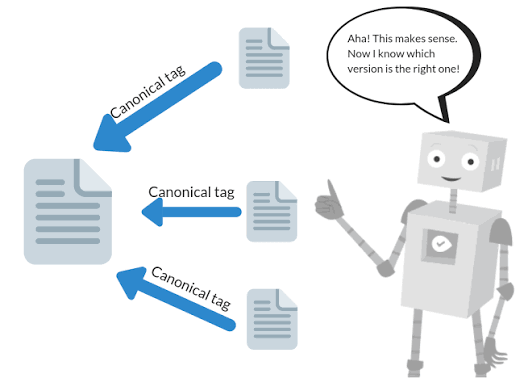
Canonical tags aren't something most customers will ever notice on your website. They sit quietly inside the code, helping search engines determine which version of a webpage should be treated as the primary version.
That might sound overly technical, but canonical tags solve a surprisingly common SEO problem.
A website can unintentionally create several URLs containing identical or very similar content. Search engines then have to determine which URL should appear in search results. A correctly implemented canonical tag provides a strong signal about which version you prefer.
For business owners investing in SEO services, understanding this concept helps explain why technical website structure matters just as much as keywords and content.
What Is a Canonical Tag?
A canonical tag is a piece of HTML code placed within a webpage's <head> section.
It looks similar to this:
<link rel="canonical" href="https://example.com/preferred-page/">
The URL inside the tag identifies the preferred version of the page.
For example, a website might accidentally make the same content accessible through multiple URLs because of tracking parameters, filters, URL variations, or platform settings.
Without additional guidance, Google has to decide which version should represent that content.
A canonical tag helps provide that guidance.
Why Can Duplicate URLs Become an SEO Problem?
Duplicate content doesn't automatically mean your website will receive a Google penalty. That's a common misconception.
The larger concern is efficiency and clarity.
If several URLs contain essentially the same information, search engines may have to determine:
Which page should be indexed
Which version should appear in search results
Where ranking signals should be consolidated
Which URL should receive the greatest crawling attention
Google explains that canonicalization helps it select a representative URL from a group of duplicate or very similar pages. Google
Giving search engines clearer signals reduces unnecessary ambiguity.
How Do Duplicate URLs Get Created?
Business owners rarely create duplicate URLs intentionally.
They can appear because of the technology powering the website.
Common causes include:
HTTP and HTTPS versions
WWW and non-WWW versions
URL parameters
Tracking parameters
Ecommerce filters
Printer-friendly pages
Category systems
Sorting options
CMS-generated URLs
You might look at your website and see one page while a search engine crawler discovers several URL variations.
That's one reason a professional SEO audit should examine the technical structure instead of evaluating only visible content.
What Is a Self-Referencing Canonical?
A self-referencing canonical points back to the page where the tag appears.
Suppose your service page is:
Its canonical tag could point directly to:
Why tell Google something that seems obvious?
Because it creates a consistent signal identifying the URL you want treated as the primary version, especially if tracking parameters or other variations eventually appear.
Self-referencing canonicals are commonly used as part of a clean technical SEO setup.
Canonical Tags and Redirects Are Different
Canonical tags and redirects are sometimes confused, but they serve different purposes.
A redirect sends visitors and search engines from one URL to another.
A canonical tag generally leaves the page accessible while indicating that another URL is preferred for indexing purposes.
If an old service page has permanently moved to a new address, a redirect may be appropriate.
If two legitimate URLs need to remain accessible but contain substantially similar content, canonicalization may make more sense.
Choosing the correct method depends on why the duplicate URLs exist.
Canonicals Can Protect Valuable Ranking Signals
Imagine several websites link to different URL variations of the same article.
Without proper canonicalization, signals associated with those URLs may be less clearly consolidated.
Canonical tags can help search engines understand that those variations belong to one primary page.
That makes canonicalization especially important for larger websites, ecommerce stores, blogs, and websites using advertising tracking parameters.
Your pay-per-click campaigns, for example, may use tracking information in URLs. Proper technical configuration can help keep those campaign variations from unnecessarily competing with primary URLs.
Canonical Tags Can Be Implemented Incorrectly
Canonicalization is powerful, but incorrect implementation can cause problems.
Common mistakes include:
Pointing canonicals to unrelated pages
Canonicalizing every page to the homepage
Using broken destination URLs
Creating conflicting canonical signals
Pointing to redirected URLs
Canonicalizing valuable unique pages elsewhere
One particularly damaging mistake is treating canonical tags as a shortcut for cleaning up an improperly structured website.
Technical SEO requires understanding what each page is supposed to accomplish before changing indexing signals.
Canonicalization Isn't a Guaranteed Command
Another important distinction is that canonical tags are signals rather than absolute directives.
Google may select a different canonical if other signals strongly indicate that another URL should represent the content.
That's why technical consistency matters.
Canonical tags should work alongside:
Internal links
XML sitemaps
Redirects
HTTPS configuration
URL structure
Website navigation
If your sitemap identifies one URL while internal links repeatedly point somewhere else, you're sending mixed signals.
Canonical Tags Matter for Local Business Websites Too
You don't need an ecommerce store with 50,000 pages to benefit from proper canonicalization.
Service-based businesses can develop duplicate URLs through website redesigns, tracking systems, landing pages, or CMS settings.
Local SEO websites may also contain many service and location pages. Each page should have a legitimate purpose and unique value.
Canonical tags shouldn't be used to disguise large amounts of duplicate city content. Instead, each location page should provide useful information specific to the customers and services associated with that area.
Technical SEO Creates a Stronger Foundation
SEO isn't simply about inserting keywords into paragraphs.
Search engines also need to crawl, interpret, organize, and index your website correctly.
Canonical tags work alongside schema markup, internal linking, XML sitemaps, robots.txt instructions, page speed improvements, and other technical elements to create a clearer website structure.
At Shane Worley, the Marketing 1, we evaluate these elements as part of a broader SEO strategy rather than treating each technical feature independently.
You can explore our digital marketing services or visit our marketing blog for additional resources covering SEO, advertising, websites, and social media.
Final Thoughts
Canonical tags aren't glamorous, and your customers will probably never know they're there. Search engines, however, can benefit greatly from the additional clarity they provide.
Proper canonicalization helps identify preferred URLs, manage duplicate or similar content, and consolidate important search signals around the pages you actually want appearing in search results.
If you're unsure whether your website has canonical tags—or whether they're configured correctly—a technical SEO review can identify potential problems before they begin affecting organic visibility.
At Shane Worley, the Marketing 1, we help small and service-based businesses strengthen the technical foundation behind their websites while connecting SEO with content, paid advertising, social media, and conversion strategy.
Contact Shane Worley, the Marketing 1 to discuss your website or request an SEO evaluation.